
States#
Role in SysML v2#
A state definition is a kind of action definition that defines the conditions under which other actions can execute. A state usage is a usage of a state definition. State definitions and usages are used to describe state-based behavior, where the execution of any particular state is triggered by events.
State machines can only be added to parts.
Write the machine as a usage, not a definition#
Both state def sm { … } and state sm { … } are accepted, but they do not mean the same thing:
part def Controller {
    attribute msg : Event;
    out port sendPort : ControlPort;

    state sm {                   // usage — 'msg' and 'sendPort' are accessible here
        entry; then Idle;
        state Idle;
        accept when msg == Event::evGo then Running;
        state Running;
    }
}
A state definition inside a part is owned by the part but not featured by it. Features
of the part — attributes, ports, actions — are therefore not accessible from inside a
state def, and standards-conforming tools reject every such access with a message along the
lines of “subsetted feature must be accessible from the subsetting feature”. A state
usage is featured by the part, and the access resolves.
Since almost every useful machine guards on an attribute or sends via a port, prefer the usage
form. Reserve state def for a machine that is defined once and used in several parts, and
keep it free of references to part features.
Supported features are:
- State machine as a usage:
state sm { ... }(preferred), or as a definitionstate def sm { ... } - Default state:
entry; then statename; - Default state selection, extended form: allows selecting the default state based on conditions.
- States, long form: may have
entry,exit, anddoactions (includingdo assign …). See OperationalRed{ entry; ... }in the listing. - States, short form: only a name is required.
- Transitions, short form: must immediately follow a state (see
accept after ... then ...in the listing). - Transitions, long form: use the extended form. See transition tGo in the listing.
- Transitions triggered by boolean conditions (
accept when), time durations (accept after) or an instant (accept at, which fires once when the clock passes it) - Transitions triggered by a signal:
accept e : Reading if e.value < 0 then Alarm;— see Accepting signals - Nested transition targets (e.g.
then S2.S21) - Parallel (orthogonal) regions:
state sm parallel { … } - Typed
acceptin actions with a bound variable (e.g.accept m:PortData via recvPort); generated code can usegetPayload()for port content - History (via naming convention of state names: for shallow history use S1**_H**; for deep history use S1**_HH**)
- Final states
Entry, exit and do: reference or declare#
entry, exit and do come in two forms that look similar but do different things:
| Form | Meaning |
|---|---|
entry setYellow; |
Reference — performs setYellow, an action that already exists on the part |
entry references setYellow; |
Same, written explicitly |
entry action setYellow; |
Declare — creates a new, empty action named setYellow on the part |
The declaring form is what you want when the behavior is filled in later or in hand-written C++. If you meant to trigger an action you already modeled, use the reference form — otherwise you silently get an empty action and nothing happens. The generator points this out with W3117 when a declaration shadows an action of the same name.
part def Controller {
    ref part yellowLamp : Lamp;

    action setYellow { first start; then perform yellowLamp.setOn; then done; }

    state sm {
        entry; then Warning;
        state Warning {
            entry setYellow;        // performs the action above
        }
    }
}
The same distinction applies to do action getMsg; versus do getMsg;.
Orthogonal regions#
state sm parallel {
    state RA {
        entry; then SA1;
        state SA1;
        state SA2;
    }
    state RB {
        entry; then SB1;
        state SB1;
        state SB2;
    }
}
A child of a parallel state may carry entry, exit and do actions of its own; they are
executed like in any other state.
The system described below is a small traffic light system. There is one central controller controlling traffic lights spread over a city as example.
The two parts communicate via ports which are connected in the system configuration.
private import ScalarValues::*;

package TrafficLight {


	// definition of events to control TrafficLightController
	enum def TLCEvent {
		evOperational;
		evError;
	}

	item def PortData{
		attribute msg : TLCEvent;
	}


	port def ControlPortData {
		in item data:PortData;
	}

	part def Lamp {
		attribute switchCounter : Natural default 0;
		action setOn  { assign switchCounter := switchCounter + 1; }
		action setOff { assign switchCounter := switchCounter + 1; }
	}

	// traffic management center
	part def TrafficManagementCenter{
		out port sendPort : ControlPortData;

		state tmcStateMachine {
			entry; then PreOperational;

			state PreOperational;
			accept after 2[SI::second] do send TLCEvent::evOperational via sendPort then Operational;

			state Operational {

			}
		}
	}

	part def TrafficLightController{

		attribute redtime:Integer default 1;
		attribute msg:TLCEvent;

		in port recvPort : ~ControlPortData;

		action getMsg{
			action accept m:PortData via recvPort{
				assign msg:=m.msg;
			}
		}

		// the lamps this controller drives; wired from outside
		ref part redLamp    : Lamp;
		ref part yellowLamp : Lamp;
		ref part greenLamp  : Lamp;

		// each action performs behaviour that belongs to a lamp
		action setRed    { first start; then perform redLamp.setOn;     then done; }
		action resetRed  { first start; then perform redLamp.setOff;    then done; }
		action setYellow { first start; then perform yellowLamp.setOn;  then done; }
		action resetYellow{first start; then perform yellowLamp.setOff; then done; }
		action setGreen  { first start; then perform greenLamp.setOn;   then done; }
		action resetGreen{ first start; then perform greenLamp.setOff;  then done; }
		action setRedAndYellow {
			first start;
			then perform action redOn    references redLamp.setOn;
			then perform action yellowOn references yellowLamp.setOn;
			then done;
		}
		action resetRedAndYellow {
			first start;
			then perform action redOff    references redLamp.setOff;
			then perform action yellowOff references yellowLamp.setOff;
			then done;
		}

		state tlcStateMachine {
			entry; then OutOfService;
			do action getMsg;

			state  OutOfService {
				entry; then OutOfServiceYellowOn;

				state OutOfServiceYellowOn{
					entry setYellow;
				}
				accept after 0.5[SI::second] then OutOfServiceYellowOff;

				state OutOfServiceYellowOff {
					entry resetYellow;
				}
				accept after 0.5[SI::second] then OutOfServiceYellowOn;

			}
			transition tGo first OutOfService accept when msg==TLCEvent::evOperational then Operational;

			state Operational {
				entry; then OperationalRed;

				state OperationalRed {
					entry setRed;
					exit resetRed;
				}

				state OperationalRedYellow {
					entry setRedAndYellow;
					exit resetRedAndYellow;
				}

				state OperationalGreen {
					entry setGreen;
					exit resetGreen;
				}

				state OperationalYellow {
					entry setYellow;
					exit resetYellow;
				}

				transition t1 first OperationalRed  accept after redtime[SI::second] then OperationalRedYellow;
				transition t2 first OperationalRedYellow  accept after 1[SI::second] then OperationalGreen;
				transition t3 first OperationalGreen  accept after 1[SI::second] then OperationalYellow;
				transition t4 first OperationalYellow  accept after 1[SI::second] then OperationalRed;
			}
			transition tErr first Operational if msg==TLCEvent::evError then OutOfService;
		}
	}


	// Main system composition
	part def TrafficLightSystem {
		doc /*
		* Main system that contains the parts
		*/
		part tmc : TrafficManagementCenter;
		part tlc : TrafficLightController;

		// Connect the parts
		connect tmc.sendPort to tlc.recvPort;
	}
}
The system, including the state machines, can then be fully translated into executable C++ code and follows the well-known Sinelabore RT state machine structure.
The two machines as diagrams#
Both pictures below are rendered from the model text — no diagram was drawn by hand, and nothing has to be kept in sync when the model changes.
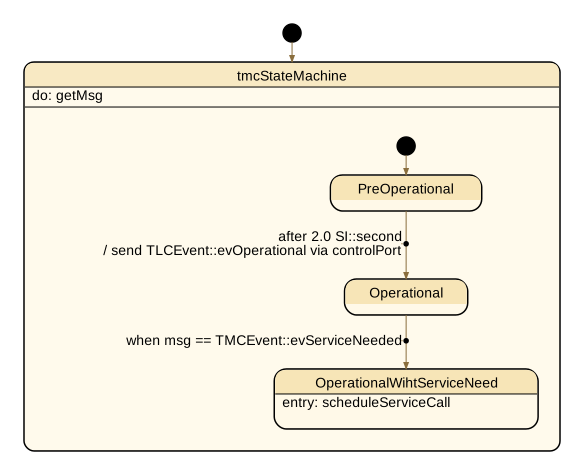
The management center is a plain sequence: it starts in PreOperational, broadcasts the
operational event after two seconds, and moves on when a traffic light reports that it needs
maintenance.
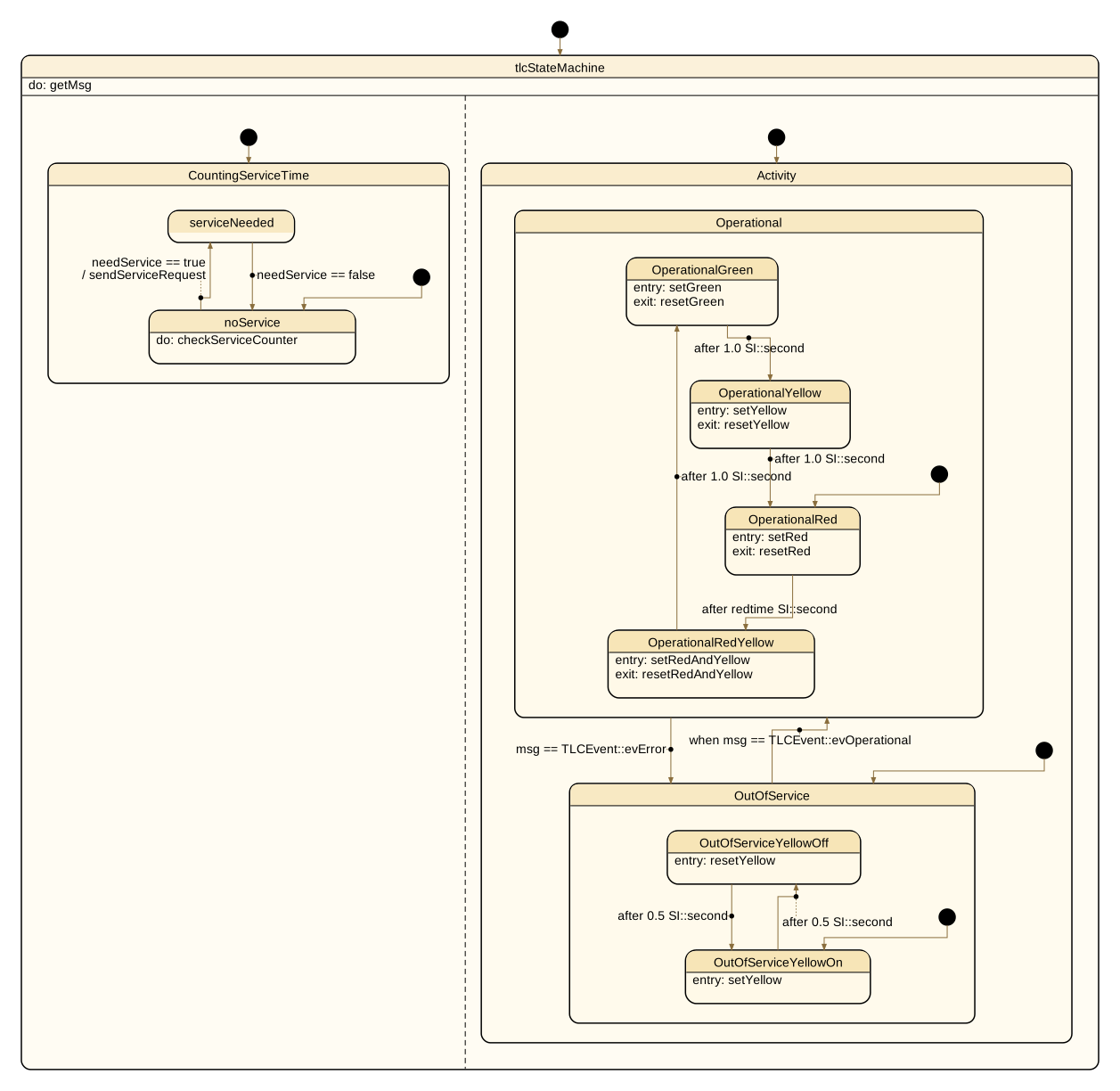
The traffic light is a parallel machine. Its two regions are shown side by side and run
independently: Activity drives the lamp sequence — blinking yellow while out of service, then
the red → red+yellow → green → yellow cycle — while CountingServiceTime watches the lamp
switch counters and requests service when a threshold is exceeded. Each region has its own
initial state, marked by the filled circle.
These pictures come from the full example on GitHub, which extends the listing above with a second traffic light and the service counting region. See Tooling and Validation for how the diagrams are produced.
Transition triggered by timeouts#
A great new feature with SysML v2 is the ability to trigger transitions by timeouts. In UML this was also possible, but in a much more limited way.
transition t1 first start state accept after 0.1[SI::second] then next state;The code generator emits the required code to manage duration triggered transitions. The only requirement is to execute the state machine method of the part cyclically (see ‘main.cpp’ below).
Time units#
A duration is written with its unit, and the generator converts it to milliseconds when the code is generated:
accept after 2 [s] then Next;
accept after 0.5 [min] then Next;
accept after settle + 250 [ms] then Next;    // a DurationValue feature plus a constant
The bundled SI declares the second and the units built on it without a prefix: s, min,
h and d, also written SI::second, SI::minute and SI::hour. A prefixed unit such as the
millisecond is declared once in the model, the way the SI library declares its own:
private import ISQ::*;
private import SI::*;
private import MeasurementReferences::*;

attribute <ms> millisecond : DurationUnit {
    :>> unitConversion : ConversionByPrefix { :>> prefix = milli; :>> referenceUnit = s; }
}
A unit that is not declared is reported as E3250, with the declaration to add. A feature used
as a duration is typed DurationValue: attribute settle : DurationValue = 2 [s];.
Accepting signals#
A transition can accept a signal — an occurrence of an item or attribute definition — and use what it carries:
item def Reading { attribute value : Integer; }

part def Monitor {
    attribute last : Integer default 0;

    state sm {
        entry; then Watching;

        state Watching;
            accept e : Reading if e.value < 0 do assign last := e.value then Alarm;

        state Alarm;
            accept e : Reading if e.value >= 0 then Watching;
    }
}
accept e : Reading names what arrived, and the guard and the effect read it as e;
accept Reading then … takes the signal without naming it. No event enum is needed: the machine
keeps a queue of signals, takes one per step and selects the transition by the signal’s type.
A driver hands the machine a signal and steps the part. Another part reaches it with
send new Reading(-3) to monitor;.
Monitor m;
m.init();
m.stateMachine.send(Reading{-3});
m.process();                        // Watching -> Alarm, last == -3
The machine keeps the current event and the queue in fields named event_ and eventQueue_, so
a feature of either name is reported (E3248). An enumeration literal is a value, not a type:
accept TLCEvent::evGo is reported (E3249) — compare the value in a guard instead, as the
traffic light above does.
Executing a model#
For each state machine, a state-handling method with the same name as the topmost state def of the part is generated. Set the following parameters in codegen.cfg; otherwise the compiler will fail:
UseEnumBaseTypes=yesUseStdLibrary = yesCallInitializeInCtor = noEnumBaseTypeForEvents = std::int16_t
It is intended to execute the model directly in a main function. Usually only minimal code is
required to do so. By default, process() and init() methods are generated per part.
init() creates and initializes the parts a part contains and wires the connections;
process() steps the state machines that part drives and then the parts it contains.
That means one call drives the whole system: process() on the top part. A machine
initializes itself on its first step, so nothing has to be prepared beforehand.
In some cases you may want to add your own behavior. Then subclass the generated Part
classes and implement the intended business logic and handlers. If you override init() or
process(), call the base-class method as well, or the parts below will no longer be
initialized or stepped.
Here is an example of a simple main function:
using namespace TrafficLight;


// --- Main ---
int main() {
    TrafficLightSystem tls;

    // creates the parts it contains and wires the connections
    tls.init();

    for ( int i = 0; i < 80; i++ ) {
        // one scan: every machine in the system is stepped, top part downwards
        tls.process();
        std::this_thread::sleep_for(std::chrono::milliseconds(100));
    }
    std::cout << "[Main] Done.\n";
    return 0;
}
The complete code of this example is available on our GitHub site.