Table of Contents
Generating CPP Code from SysML V2 textual models
 SysML V2 is a newer version of SysML that is more flexible and powerful.
An important aspect is that it now allows to write textual models.
This lowers the entry barrier to the model based system development a lot
becasue no special tools are needed to write the models. E.g. a
Visual Studio Code plugin is available to write SysML V2 models.
The Sinelabore Code Generator supports code generation from SysML V2 models.
In opposite to the current Sinelabore capabilites, the
code generation also supports the generation of structural code and
not just the generation of state machine code.
SysML V2 is a newer version of SysML that is more flexible and powerful.
An important aspect is that it now allows to write textual models.
This lowers the entry barrier to the model based system development a lot
becasue no special tools are needed to write the models. E.g. a
Visual Studio Code plugin is available to write SysML V2 models.
The Sinelabore Code Generator supports code generation from SysML V2 models.
In opposite to the current Sinelabore capabilites, the
code generation also supports the generation of structural code and
not just the generation of state machine code.
This means that also code for parts, interactions between parts and so forth is generated. This can be used to quickly generate mockups and simulations of an intended system.
To generate CPP code from a sysml model call the code generator with the
command line flag -l Sysml2Text.
A fully functional example is available on our github site.
Introduction
The present version only supports a small subset of the powerful SysML V2 feature set. Over time more features might be added. Main goal of this first version of the SysML V2 backend is to support a relevant set of features to generate code for state machines and the interaction of statemachines between parts.
To execute the generated code a small header only runtime environment is provided. It contains some base classes and implements inter-part communication via ports and timeout handling. So just the minimum to execute a model.
In case a part contains a state machine the code generatior also generates additional files
for the state machine. This code follows the structure that is already used by
the cppx backend.
- Parts: Parts are the main building blocks of a system. They can contain other parts, attributes, a state machine, actions, enums, connections and ports. Parts are realized as CPP classes in the generated code. If a part contains other parts you are responsible to create them in the init method. Create a subclass of the part class and override the init method. Then call the base class init method. Example:
part def P1{part p2:P3;} - Attributes Parts can have attributes. Attributes can have a base type and a default value. Attributes can contain other attributes. Attributes are translated to CPP member variables. Depending on the type of the attribute it is realized as a basic data type or a class. Example:
attribute a:bool;
- Enums: Basic enums with their enum values can be defined. Enums are directly translated to CPP enums in the generated code. Example:
enum def Color{RED; GREEN; BLUE;} - Ports: Ports are the way to communication points between parts. The framework has some helper classes to realize ports. A port marked as “
in” has a receive method, a port marked as “out” has a send method in the generated CPP code. Example:port def p {attribute x : Integer;} - Connections: Connections are the way to connect ports of parts in order to share data. Connections are realized as queues in the generated code. Only ports of the same type can be connected. One part must be marked as “
in”, one as “out”. If you need bidirectional communication you can add two other ports in opposite direction. All attributes in a port share the same direction. Example:connect p1.sendPort to p2.recvPort;}
- State Machines: A part can have a state machine. State machines are not as expressive as in UML so far, but still powerful. With the help of a TimerManager class in the framework, timed transitions can be realized. Exampel:
{state def sm { ... }}
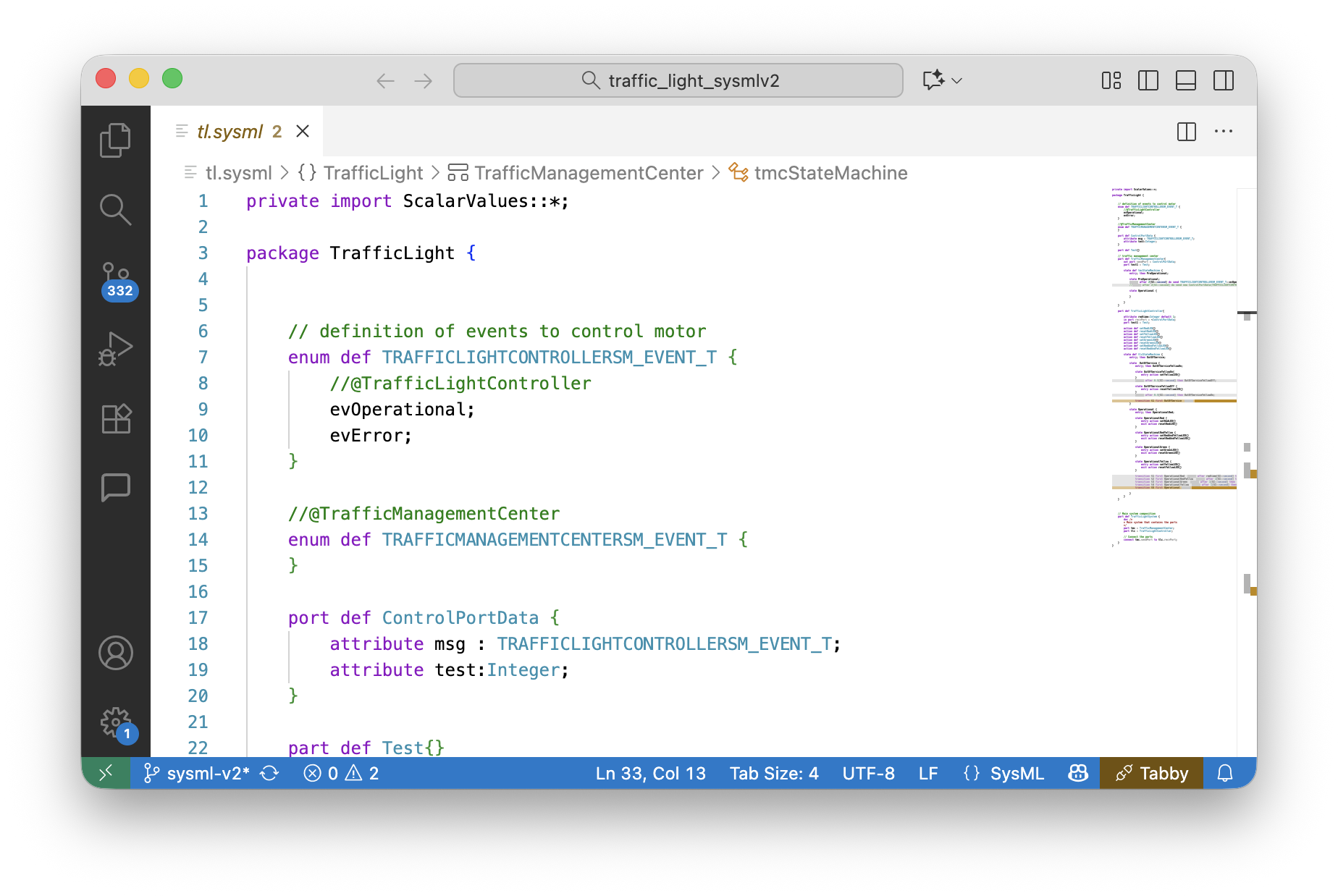
The following listing shows an example for a small traffic light control system model. It consists of three parts with some attributes and actions. The TrafficManagementCenter part represents a central control system that can control TrafficLightController parts connected via ports.
In this simple model the TrafficManagementCenter just enables a traffic light controllers to operate by sending a start event. The TrafficLightController then changes state from OutOfService to Operational and performs expected traffic light operations. In a real system this simulation is for sure much more complex. But the example is rich enough to show the available possibilities. The TrafficLightSystem part weaves together the TrafficManagementCenter and the TrafficLightController parts.
private import ScalarValues::*;

package TrafficLight {


    // definition of events to control motor
    enum def TRAFFICLIGHTCONTROLLERSM_EVENT_T {
        //@TrafficLightController
        evOperational;
        evError;
    }

    //@TrafficManagementCenter
    enum def TRAFFICMANAGEMENTCENTERSM_EVENT_T {
    }

    port def ControlPortData {
        attribute msg : TRAFFICLIGHTCONTROLLERSM_EVENT_T;
        attribute test:Integer;
    }

    part def Test{}

    // traffic management center
    part def TrafficManagementCenter{
        out port sendPort : ControlPortData;
        part test1 : Test;

        state def tmcStateMachine {
            entry; then PreOperational;

            state PreOperational;
            accept after 2[SI::second] do send new ControlPortData(TRAFFICLIGHTCONTROLLERSM_EVENT_T::evOperational,5) via sendPort then Operational;

            state Operational {

            }

        }
    }

    part def TrafficLightController{

        in port recvPort : ~ControlPortData;
        part test1 : Test;

        action def setRedLED{}
        action def resetRedLED{}
        action def setYellowLED{}
        action def resetYellowLED{}
        action def setGreenLED{}
        action def resetGreenLED{}
        action def setRedAndYellowLED{}
        action def resetRedAndYellowLED{}

        state def tlcStateMachine {
            ...
        }
    }
    // Main system composition
    part def TrafficLightSystem {
        doc /*
        * Main system that contains the parts
        */
        part tmc : TrafficManagementCenter;
        part tlc : TrafficLightController;

        // Connect the parts
        connect tmc.sendPort to tlc.recvPort;
    }
}
Adding a State Machine to a Part
A state machine can be added to a part. The following listing shows an example of a state machine definition. Presently the following features are supported which are demonstrated in the following listing.
- State machine definition:
state def sm { … } - Default state:
entry; then statename; - Default state setting extended form: This allows to select the default state based on conditions.
- States long form: They can have $entry$, $exit$ and $do$ actions. See state
OperationalRed { entry; … }as example. - States short form without details. Just a name must be given.
- Transitions short form. This transition can only directly follow a state and allows a short form.
- Transitions long form: This transition must have the extended form. An example for this is
transition t1shown in the listing.
/ definition of events
enum def TRAFFICLIGHTCONTROLLERSM_EVENT_T {
    //@TrafficLightController
    evOperational;
    evError;
}

state def tlcStateMachine {
    entry; then OutOfService;

    state  OutOfService {
        entry; then OutOfServiceYellowOn;

        state OutOfServiceYellowOn{
            entry action setYellowLED{}
        }
        accept after 0.5[SI::second] then OutOfServiceYellowOff;

        state OutOfServiceYellowOff {
            entry action resetYellowLED{}
        }
        accept after 0.5[SI::second] then OutOfServiceYellowOn;

        transition t1 first OutOfService
            accept TRAFFICLIGHTCONTROLLERSM_EVENT_T::evOperational then Operational;
    }

    state Operational {
        entry; then OperationalRed;

        state OperationalRed {
            entry action setRedLED{}
            exit action resetRedLED{}
        }

        state OperationalRedYellow {
            entry action setRedAndYellowLED{}
            exit action resetRedAndYellowLED{}
        }

        state OperationalGreen {
            entry action setGreenLED{}
            exit action resetGreenLED{}
        }

        state OperationalYellow {
            entry action setYellowLED{}
            exit action resetYellowLED{}
        }

        transition t1 first OperationalRed  accept after 1[SI::second]
            then OperationalRedYellow;
        transition t2 first OperationalRedYellow  accept after 1[SI::second]
            then OperationalGreen;
        transition t3 first OperationalGreen  accept after 1[SI::second]
            then OperationalYellow;
        transition t4 first OperationalYellow  accept after 1[SI::second]
            then OperationalRed;
        transition t5 first Operational
            accept TRAFFICLIGHTCONTROLLERSM_EVENT_T::evError then OutOfService;

    }
}
The system including the state machines are then fully generated following the well known SinelaboreRT state machine structure.
Defining Events
It is required to use enums to define events to be processed by the state machine.
It is necessary to add a comment in the enum that starts with
//@. --> example see above
plus the name of the part containing the state machine processing the events.
Transition triggered by Timeouts
A great new feature with SysML V2 is the ability to trigger transitions by timeouts. In UML this was also possible but in much more limited way.
transition t1 first start state accept after 0.1[SI::second] then next state;
At present the time can only be specified in seconds. If other units are needed you can write e.g. 0.001[SI::second] for 1 millisecond. Each part has by default a TimerManager class that is used to manage the timeouts. The code generator generates the needed entry code to start the timer if the state is entered. Also the exit code is generated to stop the timer when the state is left. A timeout event is added to the event list.
Basic executing a model
It is possible to directly execute the model in a CPP main function. But in most cases you you might want to add own CPP behaviour. Then it is necessary to subclass the generated Part classes and implement the
intended business logic and handlers (i.e. methods of the generated part classes). By default a process() and init() method is generated per part.
If needed overwrite these two methods and add your own code. Then call the baseclass method to ensure that the part is initialized correctly. Parts used in a part (i.e. sub-parts) must be created in the init method.
Here is an example for a simple main program:
MyTrafficLightSystem tls;

tls.init();

// Start process thread
for(int i = 0; i < 80; i++) {
   tls.process();
   std::this_thread::sleep_for(std::chrono::milliseconds(100));
}
Executing Model with State Machines
For each state machine, state handling classes are generated (details see section '3.4. Generating C++ Code' in the manual). Set the following parameters in the config file – codegen.cfg otherwise the compiler will fail:
- UseEnumBaseTypes=yes
- UseStdLibrary = yes
- CallInitializeInCtor = no
- EnumBaseTypeForEvents = std::int16_t
A state handling method named like the topmost state def of the part is generated.
For ports and timeouts a handler method is added into the generated part class. Overwrite this handler in your derived class and forward the timeout event or the event received in the port to the state machine. Examples for such handlers are as follows:
    void onTimeout(const TLCEvent& e) override{
        std::cout << "[MyTrafficLightController] Timeout fired with id="
            << getNameByEvent(e)<< std::endl;
        // put event to input queue to be able to handle it via sysml code
        recvPort.receive(ControlPortDataDef{e});
        tlcStateMachine();
}
Missing Features
Sysml V2 is a very rich model language. There are many features that are not yet supported by the code generator. The following list is not exhaustive but list some of the not supported features. Take a look at the code on github to see what is used in the code generator and therefore supported.
- Regions in state machines
- Inner transitions
- Attributes can't be qualified by additional keywords like $ordered$ or $unique$
- Attributes can't have multiplicity
- Referencing, Subsetting, …
- Additions features in enums beside basic definition
- Other inter part communication features than ports and connections as shown above
- The complete model must reside in a single file. It is not supported to split the model into multiple files.
- Sysml imports are ignored and no code is generated for them. But it still useful just to satisfy sysmlv2 editors and get rid of error messages.
- Many other features not shown in the example code.